Social Ventures and Entrepreneurship: Balancing Profit and Purpose
Posted in BlogOctober 22, 2012No comments


Posted in BlogOctober 22, 2012No comments
Posted in BlogNovember 15, 20102 comments
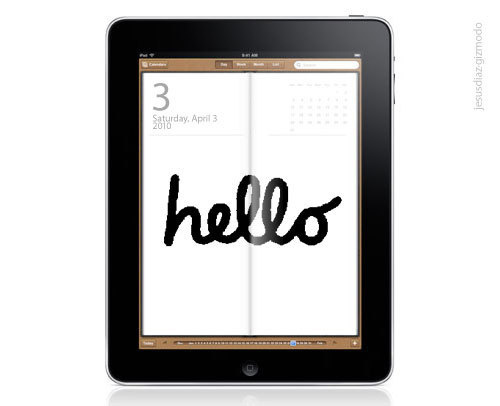 What is an iPad? Is it an oversized iPhone? Is it a MacBook Pro with fewer features? I listen to the critics and the pundits talk about the iPad and weigh in and give their opinion.
What is the iPad to Me
“The iPad is not a tool but a ball of Clay. Creative Thinkers will re-imagine uses for the iPad and disrupt industries.”
- Hajj E. Flemings -Personal Brand Strategist
The iPad is the latest is a series of disruptive products produced by Apple: iPod, iPhone, and now the iPad. The iPad is set to disrupt the media, publishing, entertainment and business industries.
I am writing this blog post as an owner and practitioners of the iPad. I have read quite a few posts from people suggesting the top apps and it is clear to me that they don’t own an iPad or have used it for any period of time. ( I will now get off my soap box : )
As a personal brand, entrepreneur, and consultant I have found that it helps me to manage my business in very creative and efficient ways. Listed below are the 22-apps that I have used and believe are critical business use.
 1. Time Master – Time Master is a great time management app that is great for consultants, entrepreneurs, attorneys, and contractors. This app allows you to track time and expenses and export billing to excel. You have the ability to add modules that will allow you to export to Quickbooks.
 2. Sound Note – Sound Note is an app that allows you to take written notes and record audio notes and save them as M4A format. The app allows you to track what you were typing and drawing while recording the audio.
 3. Text Plus – The Text Plus iPad app allows you to send text messages from your iPad. This app is great to use when you are in meetings and you need to respond to text message or send one and it isn’t appropriate to text from your phone.
 4. Task Pro – Task PRO is a powerful, flexible and elegant task management application for the iPad. It fully supports sub-tasking, a powerful mechanism that gives you complete control over managing and organizing your tasks. It’s very simple and intuitive to use. You can easily create simple Todo list, or have multiple complex projects side by side.
 5. WebEx – The Webex app allows you to access WebEx meetings on your iPad, wherever you are! This app gives you full meeting experience with simultaneous data and audio.
 6. GotoMeeting – The GoToMeeting app is an easy way to attend online meetings – and now you can take it to go! View slide presentations, design mockups, spreadsheets, reports – whatever meeting presenters choose to share on-screen.
 7. Desktop Connect – The Desktop Connect app allows fast, full-featured desktop viewing. View and control Windows, Mac OSX and Linux computers as if you were sitting in front of them, or observe others as if you were watching over their shoulder. This app allows you view webistes with Adobe Flash.
 8. iThoughts HD (Mind Mapping) - iThoughtsHD is a mindmapping app that will import and export mindmaps to and from many of the most popular desktop mindmap applications such as Freemind, XMind, Novamind, MindManager, MindView, iMindmap and PDFs.
 9. Dropbox – Dropbox is an app that allows you to sync, and, share files online. Great for storing files for your business and projects that you are working on. Great for businesses that need to have multi-member teams access to files.
 10. Box.net – Box.net is an app that allows you to sync, and, share files online. Great for storing files for your business and projects that you are working on. Great for businesses that need to have multi-member teams access to files.
 11. Mobile Me – MobileMe is an app that allows you to automatically pushes new email, contacts, and calendar events to your iPhone, Mac, and PC. So your devices always stay in perfect sync. MobileMe is also great for storing files on a cloud.
 12. Google Mobile Apps – Google Mobile app allows you to access Google search and Google apps like Docs, Calendar and Gmail. If you view docs in desktop version you have the ability to edit docs.
 13. Square – Square is an app that allows you to accept credit card payments anywhere on your iPad without having a credit card merchant account. All you need is to plug in the free credit card reader into the headphone jack to authorize payments out of the office.
Documents/Presentations
 14. Office 2 HD – Office2 HD supports creation and editing of Word and Excel files. It does support Word and Excel import and export though, unlike the iWork suite. Office HD 2 supports Google Docs, Box.net, Dropbox, iDisk, and SugarSync online storage services.
 15. Docs2Go – Documents to Go is a cloud file support app that allows you to view, import, and export: Word, Excel, and PowerPoint files. Documents To Go supports Google Docs, Box.net, Dropbox, iDisk, and SugarSync online storage services.
 16. Evernote – Evernote is a great app to capture notes, text, photos using your computer, phone, and the web. Keeping notes from meetings, research on various topics.
 17. Keynote – Keynote is one of the apps form the iWork suite. This presentation application on the iPad allows you to send your presentation in Microsoft PowerPoint or PDF format to anyone via Mail or iWork.com public beta, or copy it to your MobileMe iDisk, your Mac or PC, or to the web using WebDAV.
 18. Sign my Pad - Sign My Pad is an iPad PDF signature app that allows you to download PDF files modify them with: text, a radio button or checkbox, the date and your signature. This app allows you to save time in scanning, faxing, and gives you the ability to sign important documents on the go.
Social Networking
 19. Tweetdeck – The Tweetdeck iPad app allows you to access, organize, and manage your Twitter accounts and is great for tweeting on the go.
 20. Twitter – The Twitter iPad app allows you to access, organize, and manage your Twitter accounts and is great for tweeting on the go.
I hope you found this blog post helpful. Enjoy your iPad.
Posted in Blog,Career Development,Entrepreneurship,Lifestyle,Personal Branding,PurposeJuly 26, 20104 comments
 Personal brands operate in one of three worlds: Builders, Grustlers, or Leapers. Now let’s break down the three types, as you read through the descriptions identify which one you are. As a backdrop the workplace is changing, emerging technology is impacting the way we live and communicate, and globalization is shifting when, where and how we work.
Builders (Intrapreneurs) – A builder is a worker that is wired to work in an existing corporate or company structure. Organized working structures typically have regular pay periods, access to company resources, and systems/processes in place that allows people to work in a structured environment. This type of individual enjoys working for someone else and building someone else’s dreams while developing themselves and their personal brand. Most universities and colleges teach students to auto-follow this mentality regardless of how a person is wired because it has been the safe option historically. The biggest benefits of this category are the halo effect and company resources.
Benefits of Builders
Examples: Jeremiah Owyang
Grustlers (Hybrids) – GRUSTLE is the combination of a daily Grind (job) and a Hustle (your passion). In my book ‘The Brand YU Life’ the first degree (or principle) is ‘Identify Your Passion’ which is the cornerstone of Grustlin’.
Definitions
Grind: A grind is a job; employment; typically your primary source of income.
Hustle: A hustle is your passion, what you would love to do full-time and what gives you the most satisfaction. It is what you typically do after you work your daily grind.
Your career/job is the primary source of income that you use to seed your passion. This is a minimal risk option that allows you to develop and grow your ideas without the pressure or financial weight of doing it full-time. This personal brand type tends to operate as more of a transitional phase for people shifting from being a builder to a leaper. There are various forms of Grustle: (1) Being a college student and establishing a blog or having a 9-to-5 job and starting a business on the side are two examples.
Benefits of Grustlers
Examples: Gary Vaynerchuk
Leapers (Entrepreneurs) – Pure entrepreneurship doesn’t appear typically to be innate because it is talked out of us as a child by parents and teachers. In college we are brainwashed to think of ourselves as builders only. It is only after years of making someone else rich, being downsized, outsourced, or fired that we are forced to follow our passion. Some do arrive here after working for someone else and having a great work experience.
Benefits of Leapers
Examples: Kevin Carroll, Mark Zuckerberg
Note: It is possible to be a hybrid of each type as you transition from one phase to another.
People will tell you that you need to work on your own. That is not necessarily true. You have to identify how you are wired. The pressure of being financially responsible for a company is a hugh undertaking your timing and developing must be right. Being true to where you are is the key. There are great success stories in each category.
How you manage your online personal brand should be dictated by the type of personal brand that you are and the stage of your career that you are in.
Demographics
Identify your personal branding type: Builder, Grustler, or Leaper. The Leaper lifestyle is glorified because it can be a great rag to riches story, or one that changes the world like Microsoft (Bill Gates) or Facebook (Mark Zuckerberg). It can be a recipe of disaster if you are not wired for it.
Posted in Blog,EntrepreneurshipMay 28, 20105 comments
The #mbachat is a 1-hour discussion on Twitter where anyone can participate in our open source conversation. The Twitter Chat is on Monday, May 31st 7:30pm-8:30pm EST we will have three serial entrepreneurs: Melinda Emerson (@SmallBizLady), Matt Wilson (@MattWilsonTV), and Cindy W. Morrison (@CindyWMorrison), and host Hajj E. Flemings who will answer questions that relate to Entrepreneurship.
Come and pick the brains of these practitioners who are living the entrepreneurship lifestyle and not just talking about it in theory.
How to Follow and Participate:
To participate you can use http://search.twitter.com or http://tweetgrid.com/. Watch for tweets with the hashtag #mbachat and follow the conversation on the @TechMBAOnline Twitter account.
This chat is sponsored by Michigan Tech MBA Online program: www.mbaonline.mtu.edu.
#mbachat Guest
Melinda Emerson – Author of Become Your Own Boss in 12 months/Host of #Smallbizchat
Melinda Emerson “Smallbizlady” is a seasoned entrepreneur, professional speaker, and small business coach. Her areas of expertise include small business start-up, business development and social media strategy. Melinda hosts #Smallbizchat, a weekly talk show on Twitter. #Smallbizchat is the trusted resource on Twitter to discuss everything entrepreneurs need to know about launching and running a profitable small business. Melinda has been featured on NBC Nightly News and in the Wall Street Journal, U.S. News and World Report and Black Enterprise. Melinda publishes a resource blog www.succeedasyourownboss.com and has several special reports including 44 Things To Do Before You Go Into Business and The 12 Cardinal Sins of Small Business—and How to Avoid Them! Melinda’s first book Become Your Own Boss in 12 months; A Month-by-Month Guide to Start a Business that Works!” was released in March 2010 by Adams Media. For more information, please visit www.melindaemerson.com
Matt Wilson, Co-founder of Under30CEO.com
Matt Wilson is co-founder of Under30CEO.com a website dedicated to giving young entrepreneurs the tools and resources they need to succeed. After using social media to create huge buzz online around the brand, landing Under30CEO on MSNBC and BusinessWeek, he began helping others build their brands online through his own digital marketing agency. Wilson’s passion for entrepreneurship began at Bryant University after where he led the Collegiate Entrepreneurs’ Organization to becoming the world’s #1 entrepreneurship organization and earned personal accolades as National Student Leader of the Year. His personal mission is to inspire young people to use technology to create opportunity and become leaders.
If Matt is around he will be easy to spot as his long luxurious hair is generally flowing freely in the breeze.
Cindy W. Morrison – Author of Girlfriend 2.0/Emmy Award-Winning TV Broadcaster
Emmy award winning TV Broadcaster Cindy W Morrison successfully reinvented herself after the economy lead to corporate downsizing. Leaving a 20 year news career behind, Cindy wrote a book, hit the speaking circuit and created her own consulting business. She now teaches people how to reboot, upgrade and reinvent through networking, social media and branding so they can make more money and live a better life.
Cindy’s new book “Girlfriends 2.0″ is already a cult favorite and she hosts a popular show by the same name for The WIN Online (Women’s Information Network). Plus, Cindy does a weekly radio show with the founder of the Diva Toolbox based on the Girlfriends 2.0 concept. The idea is to empower women to reboot and upgrade their Girlfriend Network so they can not only survive but thrive our changing times
Cindy also speaks across the country about “Reinvention 2.0″ and how anyone can network strategically to be more successful. In fact, Cindy is the media contributor to Startup Princess which has been named one of the top women’s websites by Forbes and Entrepreneur. As a consultant, Cindy’s clients range from TV stations to major universities to heavy hitting corporations. Cindy helps companies and individuals use social media to create brand loyalty and get the kind of media coverage that money can’t buy.


