Most of the conversation of building your personal brand through social media focuses on the big three. No I am not talking about DWade, Lebron James, and Chris Bosh. The big three in social media are Facebook, Twitter and Linkedin. The old saying still holds true that a picture is worth a thousand words. In the world of 140 characters or less, 30-second commercial spots, text messages and sound bytes you have a short window to capture people’s attention.
Slideshare is a great social network that is probably under utilized in your social media strategy. Slideshare is design to allow you to share visual stories that display your expertise or authority in a specific subject matter. To successfully lever the power of Slideshare focus on building stories not slides. Successful usage of this channel is to challenge yourself to be a visual thinker and to incorporate design thinking into your approach.
Basics Set-up of Slideshare
- Selecting a Slideshare Account Type – There are seven different account types: company, event organizer, University/school, Ad/PR/Marketing Agency, Non-Profit/Gov, Presentation Design Firm, or Professional Speaker
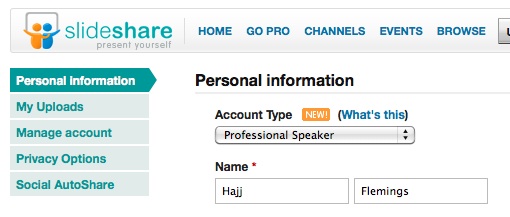
- Profile 100% Complete – One of the characteristics of any social network profile is to be 100% complete. The benefits are branding, identity, and displays your commitment to excellence and completing task.
- Connect your Facebook and Twitter Accounts
- Tags – List appropriate key words so that you can be identified under the appropriate topics when people are doing search.
- About – Clearly communicate your business purpose.
- Supported Formats: Presentations: pdf, ppt, pps, pptx, ppsx, pot, potx (Powerpoint); odp (OpenOffice); key, zip (Apple Keynote). Documents: pdf, doc, docx, rtf, xls (MSOffice); odt, ods(OpenOffice); Apple iWork Pages.
Personal Brand with Slideshare
Slideshare is a great business channel to visually communicate business and work related content that would be of interest to a business community of professionals.
- Create your Slideshare Channel – Set up your profile and develop your 700 character bio so that is aligns with your business purpose
- Customize Social Network URL – This goes without saying but customizing your social network URL for your Slideshare channel which should be consistent with your our social networks.
- Linkedin Integration – Linkedin offers the option of integrating your Linkedin presentations/documents. This enables you to visually communicate your work experience.
- Presentations/Projects – Display your expertise/experience with presentation/stories of projects that you have worked on in your niche. Also make sure you integrate the branding from the conference, company and/or project that you worked on. You can include white papers and other documents that will provide depth to your personal brand profile.
- Share Videos in Linkedin – With the video sharing capability of Linkedin you can add a video to a presentation or have your presentation just be a YouTube video and integrate it into your Linkedin profile.
- Cross Promote – Embed presentations in your blog, cross-pollinate links in your other social networks Facebook, Twitter, etc. and promote in your status updates.
- Blog Badges – One of the important ways to communicate your presentations is to have a blog badge on your website. As a standard recommendation every person should have their own personal branded hub online.
- Cover Design – Create engaging cover designs to attract interest in your content. Think about the cover of your presentation as a book cover and your content is on the shelf. Interesting covers make people want to view your presentations.
- Be a Story Teller - Communicate your expertise in a story telling format.
- Branded Channels for Business – For a fee you have the ability to create branded channels which can be used for personal brand and business purposes.
Create a Visual Resume
Creating a visual resume is a great way to visually tell your story about your work experience and your personal brand.
Recommended Slide Presentation Books
Again creating engaging presentations is an art and science and to help you navigate the murky waters of visual presentations here are my personal favorites:
Slide:ology: The Art and Science of Creating Great Presentations - Nancy Duarte
Presentation Zen Presentations: Simple Ideas on Presentation Design and Delivery – Garr Reynolds
I look forward to seeing your personal branded presentations online.
About the author
 Hajj is the founder of Brand Camp University . He has been featured on Fox 2 News (http://bit.ly/Hajj_Fox2News), ESPN.com and BusinessWeek.com on the subject of Personal Branding. His clients include Walt Disney, Ford Motor Company, Skechers Footwear, U.S. Department of Defense (Telecom Division). He has spoken at Iowa State University, Davidson College, University of Michigan and numerous colleges and universities around the nation on personal branding, social media and career development to crowds of 3,500 plus.
- More at